Import Menu from PDF
Upload a PDF of your menu and we'll extract categories and dishes automatically—or build your menu manually in our editor. Your choice.
Looking to create a digital QR menu for your restaurant? With TableMenuQR, you can build, manage, and update your menu in multiple languages in minutes. No apps required, fully optimized for international customers.
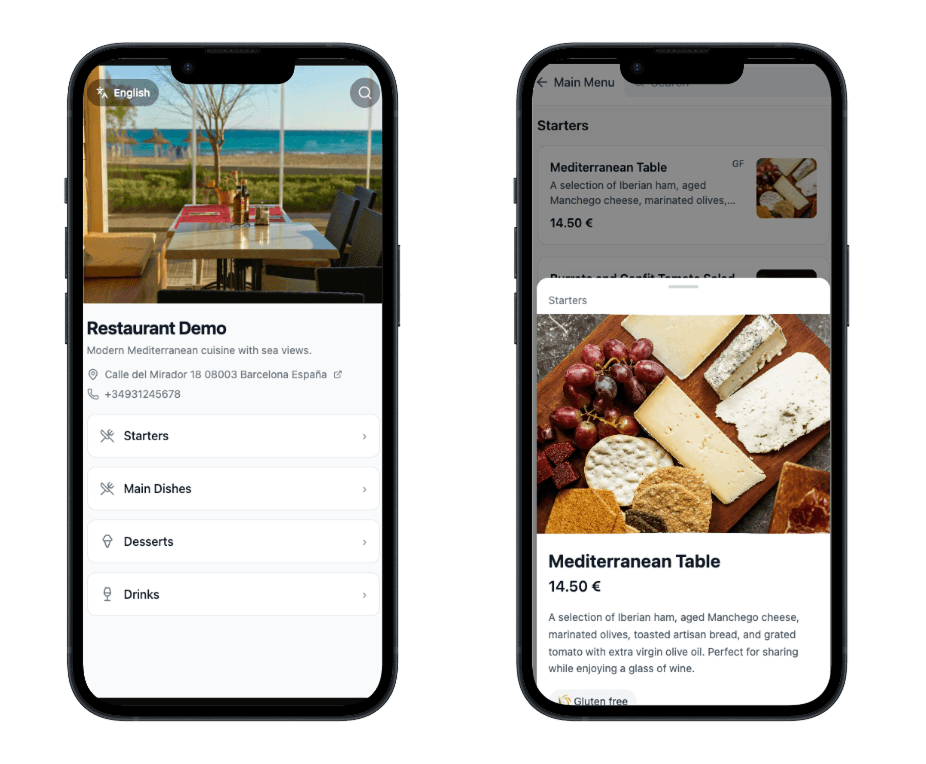
One simple tool for your digital menu, QR codes, and real-time updates—whether you run a café, bistro, or fine dining.
Upload a PDF of your menu and we'll extract categories and dishes automatically—or build your menu manually in our editor. Your choice.
Drag-and-drop editor. Change prices and dishes in real time—no coding, no reprints.
Reach global guests with one-click translations. Up to 5 languages included, with AI localized for food terminology.
Change prices, mark sold out, or add dishes from phone or computer. Guests always see the latest menu.
Your public menu page works as a mini landing page for your restaurant: name, description, and menu in one link. Perfect to share on social, in emails, or on your website.
Add links to your website, Instagram, Facebook, and more. Link to Google Reviews so guests can find you and leave a review—all from one place.
Match your brand with a clean light or dark public menu. One link, one QR—guests choose their language.
Generate branded QR codes for tables. Download in high resolution for posters, tents, or stickers.
Set up your digital menu for restaurants in minutes. No apps, no printing.
Import your menu from a PDF and we'll set up categories and items for you—or create everything manually in our intuitive editor.
Choose light or dark theme for your public menu.
Print your custom QR code or share your unique digital menu link everywhere.
Start with a 30-day free trial. One plan: 1 restaurant. For more restaurants, contact support.
1 restaurant · 5 languages · 30-day free trial
VAT may apply.
For more restaurants, contact support.
Join restaurants using TableMenuQR for multi-language digital menus and QR codes for tables. No app required for your customers.
Free 30-day trial • No credit card required
Sign up, create your restaurant, and add your menu (import from PDF or build it manually). Then generate your QR code and share the link. Your digital menu is live in minutes—no app required for customers. They scan the QR or open the link in any browser.
Yes. Your plan includes up to 5 languages. Add a main language and additional languages; we support AI-powered translation for food terms. Guests switch the language on your public menu—ideal for restaurants in tourist areas.
Any change in the dashboard (prices, descriptions, sold-out items) appears instantly on the public menu. Update from your phone, tablet, or computer—no reprints, no delays.
No. Customers scan your QR code or open your menu link and view the digital menu in their browser (Chrome, Safari, etc.) on any device. No download required.
Your plan includes up to 5 menu languages. You can add a main language and additional languages; we support AI-powered translation for food terminology. Guests switch the language on your public menu page.
Yes. You get a 30-day free trial with no credit card required. Create your account, build your digital menu, and share your QR or link. Subscribe when you’re ready to keep your menu live after the trial.
After the trial, you can subscribe to keep your menu live. If you don’t subscribe, your public menu link will be paused until you upgrade. Your data is kept so you can pick up where you left off. For more than one restaurant, contact support.